
Data Capture At Events: How To Collect, Manage And Use Event Leads Effectively
Data capture at events turns attendee interactions into useful business information you can act on after the event. Instead of collecting names and emails with no context, you can capture contact details, interests, consent, qualification data, and next steps while the conversation is still fresh.
This guide explains how to choose the right capture method, protect attendee privacy, connect event leads to your CRM, and measure whether your event investment is producing meaningful opportunities.
What Is Data Capture At Events?
Data capture at events is the process of collecting attendee information and interaction data so you can qualify, follow up with, and understand the people who engage with your brand. Depending on your event, that can include contact details, interests, survey responses, QR scans, booth interactions, product preferences, and consent records.
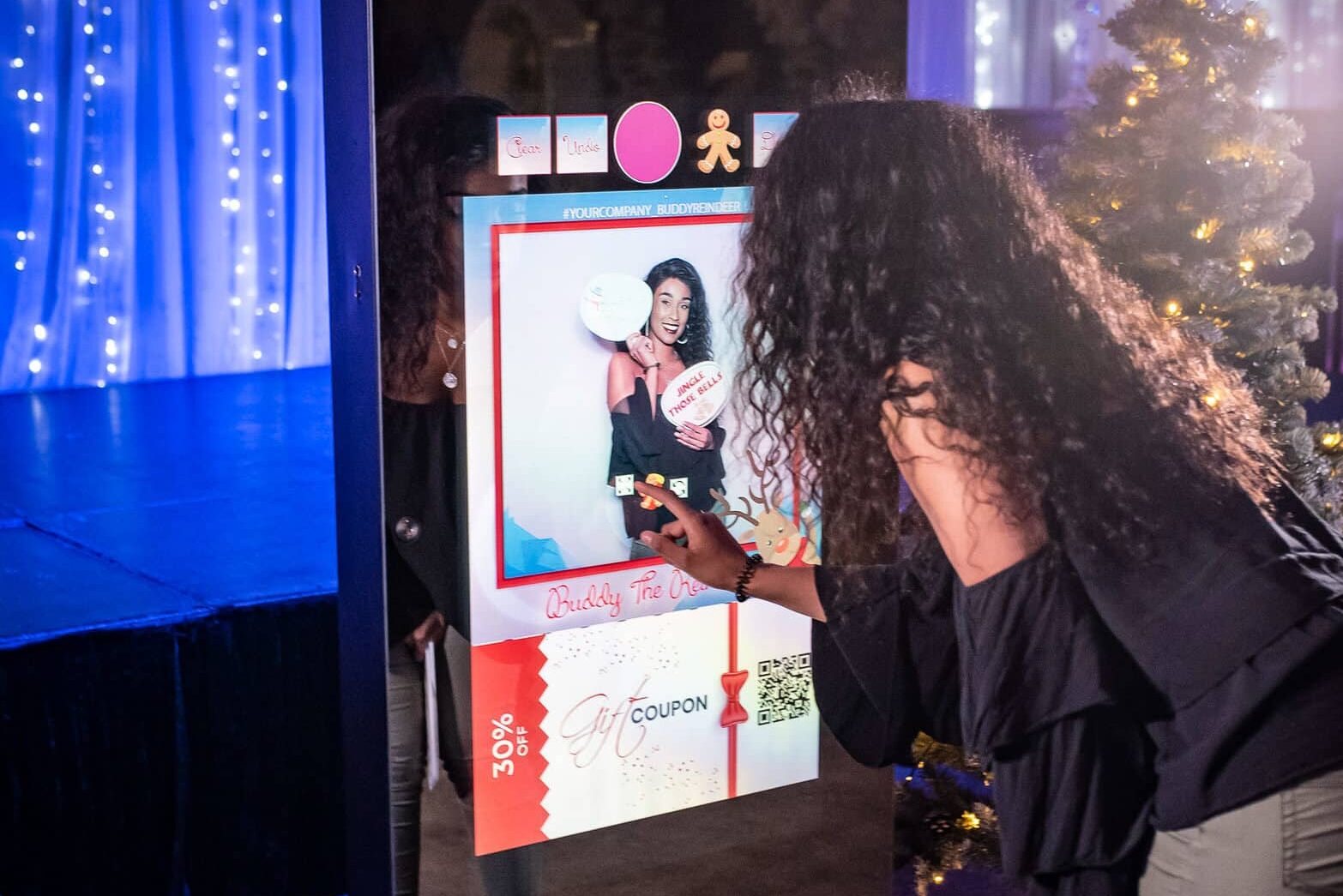
For a business using a photo booth, branded activation, experiential installation, or interactive experience, data capture can happen as part of the guest journey rather than as a separate sales form. An attendee might scan a QR code to receive a photo, enter an email to access a digital experience, or answer one qualifying question before participating.
The goal is not to collect as much information as possible. The goal is to collect useful information with a clear purpose.
A strong event data collection strategy usually connects 5 stages:
- Capture the information
- Add context and qualification
- Obtain and record appropriate consent
- Send the data to your CRM or marketing system
- Follow up and measure the resulting activity
That process turns event interactions into something your sales and marketing teams can use.
How Event Lead Capture Works
Effective event lead capture starts before the doors open. You need to decide what information matters, where it will be collected, who will manage it, and what happens after someone submits it.
For a trade show or conference, you might use badge scanning or a lead retrieval app. For a branded activation, QR code lead capture, a tablet form, NFC interaction, or a digital photo delivery workflow may make more sense.
A useful capture form should stay short. Consider collecting:
- Name
- Email address
- Company
- Job title or role
- Event or campaign name
- Area of interest
- One qualifying question
- Preferred next step
- Relevant consent preferences
You can capture additional information through a staff conversation instead of adding more form fields. For example, a team member could record a quick note such as, “Interested in a branded activation for a Q4 product launch.”
That single note can be more useful to a salesperson than several unnecessary demographic questions.
Which Event Lead Capture Technology Should You Use?
The best lead retrieval method depends on your event format, audience, traffic volume, and follow-up process. A small networking event may need nothing more than a digital business card and notes, while a busy trade show may require badge scanning and CRM integration.
QR Code Lead Capture
QR codes work well when attendees are already interacting with signage, displays, photo experiences, giveaways, presentations, or branded content.
You can create separate QR codes for different campaigns and send each one to a short mobile form. This helps you identify where a lead came from and compare engagement between experiences.
QR codes are particularly useful for self-service capture because your team does not need to manually enter every contact.
Badge And Business Card Scanning
Badge scanning is useful at conferences and trade shows where registration information is already associated with attendee badges. Business card scanning can also digitize contact information when someone hands over a physical card.
The limitation is context. A scan can tell you who someone is without telling you why they were interested.
Add a quick note, qualification tag, or next-step field immediately after the scan.
Interactive And Photo Activations
Interactive experiences can make data capture part of the experience itself. For example, you can require an email address before delivering a digital photo, use a QR code to deliver branded content, or invite participants to opt into a follow-up campaign.
This approach can work particularly well when the value exchange is obvious. The attendee receives something useful or entertaining, while you receive permission-based information that can support future communication.
How To Connect Event Data To Your CRM
An event CRM workflow should move information from the event floor into the system your sales and marketing teams already use. Manual spreadsheets can work for a small event, but they become difficult to manage when multiple staff members collect hundreds of contacts.
Ideally, your system should associate every lead with the specific event or campaign that generated it. That gives you an event-level view of performance later.
Useful CRM fields can include:
- Event name and date
- Lead source
- Staff member or activation involved
- Interest category
- Lead priority
- Timeline
- Next action
- Consent status
- Conversation notes
CRM integration also reduces duplicate entry and makes it easier to assign follow-up tasks.
If direct integration is unavailable, a structured CSV export can still work. The important thing is to define your fields before the event rather than trying to clean up inconsistent spreadsheets afterward.
How To Qualify Event Leads Before Follow-Up
Not every attendee should receive the same follow-up. Lead qualification helps you separate someone who wants a proposal next week from someone who simply enjoyed your activation.
A practical system might use 3 categories:
- Hot: Clear business need, relevant decision-maker, defined timeline, or agreed next step
- Warm: Strong interest but no immediate project or decision
- Nurture: Relevant contact with limited current buying intent
You can also capture the timeline and interest area. Someone saying, “We’re planning a 500-person corporate event in November,” should receive a different follow-up from someone who simply wants to see more examples.
Keep qualification quick. Your staff should not turn an event conversation into a 10-minute sales interview.
How To Follow Up After An Event
Fast follow-up is easier when your event data already includes conversation context. Instead of sending every contact the same generic message, use the information captured during the interaction.
For hot leads, aim to follow up within 24 hours while the conversation is still recognizable. Reference the topic discussed and confirm the next step.
Warm leads can receive a personalized message with a relevant resource, example, invitation, or consultation option. Nurture leads can enter a segmented campaign based on their stated interest.
Your CRM should create tasks and ownership rather than simply storing contacts.
A useful post-event workflow is:
- Review and clean captured data
- Confirm consent and communication preferences
- Assign lead priority
- Route leads to the correct salesperson or team
- Send personalized follow-up
- Record responses and meetings
- Track opportunities back to the original event
How Much Does Event Data Capture Cost?
There is no single market price for data capture at events because costs depend heavily on the technology, event size, integration requirements, staffing, and type of activation.
A basic QR form can be relatively inexpensive compared with a staffed interactive activation connected to a CRM and branded digital experience. Badge scanning may also be included in an event organizer’s exhibitor package or offered as an additional service.
When comparing providers, ask what the quoted price includes:
- Capture hardware or software
- QR codes and forms
- Custom branding
- Offline functionality
- Staff or technical support
- CRM integration
- Data export
- Lead qualification
- Analytics and reporting
- Privacy and consent controls
- Setup and teardown
The cheapest capture method is not always the best value. If an inexpensive form produces incomplete data that nobody follows up on, its low upfront cost does not make the campaign successful.
How To Measure Event Analytics And ROI
Event analytics should go beyond counting scans. A large contact list can look impressive while producing little commercial value.
Track the progression from attendee interaction to business outcome.
Useful metrics include:
- Total leads captured
- Qualified leads
- Lead qualification rate
- Follow-up completion rate
- Response rate
- Meetings booked
- Opportunities created
- Pipeline generated
- Revenue attributed to the event
- Cost per qualified lead
You can also compare different experiences. For example, if a photo activation generates 400 interactions and a product demonstration generates 100, the raw interaction count does not tell you which produced better business results.
Connect event data to downstream outcomes whenever possible. That lets you evaluate not only participation, but also the quality and commercial impact of the audience you reached.
How To Handle Privacy And Consent
Ethical event data collection starts with transparency. Tell attendees what information you are collecting, why you need it, and what they will receive in return.
California businesses also need to consider applicable privacy requirements. The California Consumer Privacy Act, as amended by the California Privacy Rights Act, provides consumers with rights that can include knowing what personal information is collected and how it is used, requesting deletion subject to exceptions, correcting inaccurate information, and opting out of certain sales or sharing.
Consent should also be specific to the intended communication. A person providing an email address to receive a photo does not automatically mean you should assume they want every future marketing message.
Your capture process should therefore distinguish between delivering the requested experience and optional marketing communications.
If you collect information from children or other potentially vulnerable audiences, use additional safeguards appropriate to the situation.
Local Considerations For Central Valley Events
Central Valley events can range from conferences and corporate gatherings to fairs, outdoor activations, sports events, and large venue programs. Fresno and Clovis, for example, offer convention, fairground, stadium, zoo, hotel, and flexible event facilities, creating very different requirements for connectivity, power, guest flow, and activation placement.
Bakersfield similarly has indoor and outdoor event venues, including convention center, hotel, amphitheater, and unique-event locations.
For an activation in the Central Valley, check the venue’s Wi-Fi reliability before relying entirely on cloud-based capture. You should also plan for power access, cellular connectivity, outdoor conditions, accessibility, and the distance attendees need to travel through the experience.
Offline-capable capture is especially useful when connectivity is uncertain because information can be stored and synchronized once a reliable connection is restored.
Common Mistakes to Avoid
Poor event data collection usually comes from process problems rather than a lack of technology. A few small changes before the event can prevent major cleanup afterward.
- Collecting too much information: Long forms reduce participation and create unnecessary privacy obligations, so collect only what supports the experience or follow-up
- Capturing contacts without context: A name and email alone may not tell your sales team why someone engaged, so add a short interest, qualification, or next-step field
- Ignoring consent: Using contact information beyond the purpose communicated to attendees can create trust and compliance problems, so clearly separate experience delivery from optional marketing
- Waiting to qualify leads: Trying to remember conversations days later reduces accuracy, so tag priority and add notes immediately
- Leaving data in spreadsheets: Manual files make ownership, duplicates, and follow-up harder to manage, so connect the workflow to your CRM or establish a clean import process
- Measuring scans instead of outcomes: High participation does not automatically mean commercial success, so track qualified leads, meetings, opportunities, and revenue where possible
- Depending entirely on venue Wi-Fi: Connectivity can vary across large or crowded venues, so test offline capture and have a backup connection plan
Frequently Asked Questions
What Is The Best Way To Capture Leads At An Event?
The best method depends on the event. Badge scanning works well for high-volume conferences, while QR forms are useful for self-service interactions and branded activations. For stronger qualification, combine fast digital capture with a short note, interest category, or next-step field.
How Do QR Codes Help With Event Data Collection?
QR codes let attendees open a mobile form without typing a URL or downloading software. You can create separate QR codes for different activations, locations, offers, or campaigns, making it easier to understand which parts of your event generated engagement.
What Information Should You Collect From Event Attendees?
Collect only information you have a clear reason to use. Name, email, company, interest, event source, and a short qualification question are often enough for B2B follow-up. Add phone numbers, timelines, or other fields only when they support a defined business purpose.
How Quickly Should You Follow Up With Event Leads?
Hot leads should generally receive personal follow-up within 24 hours, while the conversation is still fresh. Warm leads can receive a personalized message within a couple of days. Your CRM should assign ownership and tasks so contacts do not sit untouched after the event.
Is Event Lead Capture GDPR Or CCPA Compliant?
Compliance depends on the people involved, data collected, business practices, and applicable laws. For California events, applicable CCPA requirements should be considered when collecting personal information. Your process should clearly explain collection and use, respect applicable rights, and maintain appropriate consent and opt-out mechanisms.
Can Event Data Be Sent Directly To A CRM?
Yes. Many modern lead capture platforms can connect with CRM systems or export structured data for import. A useful setup should preserve the event source, qualification information, notes, consent status, and next action rather than transferring only basic contact details.
Do You Need Lead Capture At Every Event?
No. You may not need sophisticated lead capture for a small private event where the goal is purely entertainment or guest experience. If you do not have a legitimate follow-up or measurement objective, a complex data collection system can add friction without providing enough value.
Turn Event Data Capture Into A Better Guest And Sales Experience
If you want to improve data capture at events, start by deciding what information you genuinely need and what action should happen after someone provides it.
At Luna Events, we help businesses use photo and video activations and experiential marketing to create engaging event experiences that can support purposeful attendee data collection. We combine customised solutions, quality materials, interactive technology, and personalised planning around your event goals.
Whether you are planning a corporate activation, conference, trade show, brand experience, or another Central Valley event, our goal is to help you create an experience that engages people while giving your team useful information to act on.